Showing posts with label Reason. Show all posts

Wednesday, March 1, 2017

Reason Tips & Tricks - Stereo / Mono input switch

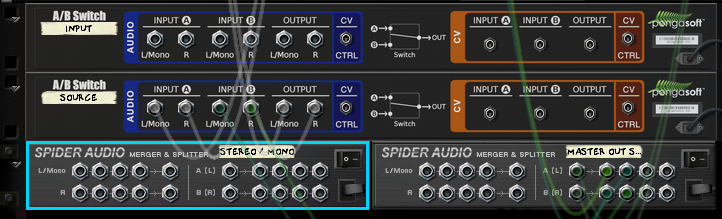
In an earlier post I made an External / Internal source input switch to go in the default Reason template. This is an alteration to that patch, which adds a Stereo / Mono input switch, useful when sampling a mono instrument and removes the need to fiddle with the cables in the back of the rack.

You can download the "mrfprod_Default.reason" file here or follow the instructions below.
My default patch uses the A/B Audio & CV Switch and the ReMark Rack Divider, both which can be downloaded for free from Propellerhead Shop.

The instructions below assumes that you've first made the External/Internal switch.

The Sampling Input Source & Stereo/Mono Switcher Patch:

1. Switch to the back and create a new A/B Switch named "Input" and a new Spider Audio unit, named "Stereo / Mono".

2. Move L & R cables from the Source switch outputs to the Input switch outputs.

3. Connect Source switch outputs to the stereo/mono spider split inputs.

4. Connect the first L&R split outputs to Input Switch input A L&R.

5.  Connect the next two splitter L&R outputs to the merge sections first two Left inputs.

6. And finally, connect the Stereo/Mono spider's Left merge output to Left Input B on the Input switch.

The final result!


There you have it! Switch easily between a stereo or mono signal, from an internal or external sound source!

If you found this useful, please leave a comment! :)

Thursday, February 23, 2017

Play!

The Moog Sub Phatty is a lovely little synth, and it amazes me every time I use it! I got one last september but I didn't do any (complete) music with it until now! Better late than... more late. :)


The song is called "Play!", and was made with the Phatty only, except for drums.


Enjoy!

Sunday, August 28, 2016

Pitch Black - Part 1 & 2

I'ts time for another mrfprod release! A two-part tune called Pitch Black.
Enjoy!


Sunday, November 29, 2015

Reason Tips & Tricks - Sampling Input Switch

I just came up with this simple but yet useful(?) patch in my default rack, and it allows you to quickly switch sampling input between your sound card's inputs and Reason's Output. This can be useful when sampling a Reason made sound into another sample based Reason instrument for further tweaking.
My sound card (Focusrite USB6) only has 2 audio input, so you can probably make some alteration to this patch if your sound card has more than 2 inputs.

This patch uses the A/B Audio and CV Switch rack extension which can be downloaded for free from the Propellerhead Shop.


The Sampling Input Switcher Patch:

Step 1
Step 2
Step 3 & 4
Step 5 & 6
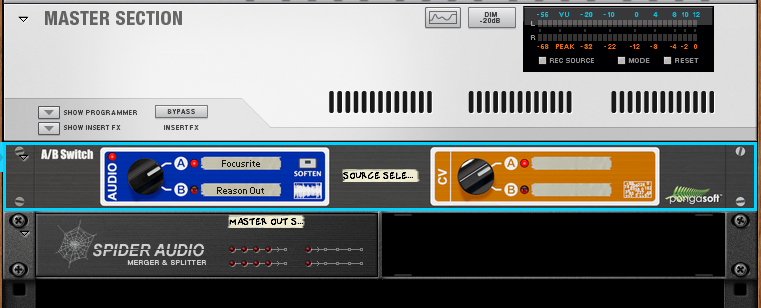
  1. Below the Master Section, create an A/B Audio & CV Switch and a Spider Audio Merger & Splitter, and give them some useful names.


  2. Switch to the back and disconnect the default Master Output and Sampling input wiring.


  3. Connect Audio I/O port 1-2 to A/B Switch Input A L&R.
  4. Connect Audio I/O Sampling Input L&R to A/B Switch Output L&R.


  5. Connect Master Section Master Out L&R to Spider Splitter inputs L&R.
  6. Connect any of the Spider's outputs to A/B Switch input B L&R, and also to Audio I/O Audio Output port 1-2.


Now you can switch between sampling inputs, quick and easy without having to make any manual patching. Save this patch preferably to your Default.reason file.

I hope you found this useful! :)

Saturday, November 28, 2015

Repeat

Once in a while I make a new song. This one was just finished! This one is not fighting the loudness war, but if you have a capable sound system you can play this one very loud! :D (tried and tested @ Studio Blue, Stockholm/Sweden)

Enjoy! :)

Thursday, November 19, 2015

Keep your Reason project organized

I've been a Propellerhead Reason user for many years and I really enjoy making music with it, but it can get a bit messy and it's easy to get lost in the rack. Therefore I would like to share my way of keeping the mixer, rack and sequencer clean and organized! :)


Standard Template:
I made a custom template for all new projects. It consists of my standard setup of master send effects and also pre-made columns per instrument type:
Standard Send Effects

Send Effects:
1. The Echo
2. RV7000 1
3. RV7000 2
4. RV-7 1
5. RV-7 2


Standard Rack Columns
Rack Columns (L to R):
Drums
Bass
Synth
Acoustic
Vocals

I use the free Rack Extension plugin "Remark" for naming the columns, and for naming and marking other stuff inside the rack. I never put any instruments below the send effects in the "Master Section column" as it's "reserved" for effects only.


Channel & Sequencer Order:
I place the SSL mixer channels and Sequencer tracks in the same basic order as the Rack Columns. Drums and percussions goes to the far left,  followed by bass, synths, acoustic instruments and vocals.


Color Coding:
I use my own standardized way to color code instruments and automations as this makes it easier for me to quickly find the instrument I'm looking for, especially in the sequencer. I also use the same colors when I use other DAW's such as Reaper.

My choice of colors are (by the names given in Reason):

Red - for drums and percussions.
Steel Blue - for bass sounds.
Moss Green - for synths
Kelly Green - for acoustic instruments like piano, strings etc.
Orange - for electric guitars.
Lilac - for vocals or choirs.
Wheat - for all automations

By coloring all automations in the same color makes them stand out from the midi and audio clips so they can easily be spotted or ignored depending on what you are searching for in the sequencer.
In Reason 8 be also sure to check "Auto-color Tracks and Channels" under Options menu to keep channel strip and sequencer track colors the same!


BUS naming
Naming:
Keep the names of the channels short and informational. If I make a bus in the SSL I will always give it a name in UPPERCASE.

Naming Automation Clips
I also name all automation clips, so I quickly can see what parameter it's changing.

Sometimes I also name midi and audio clips but not all the time.


Blocks:
Blocks as markers
Blocks can be useful sometimes, but when making complex automations or transitions between blocks it's often better to not put the clips into blocks. Another way of using blocks is to use them as markers for different pars of your song.


Combinators:
Combinators for everything
Every instrument, I put inside a combinator. It's rather seldom I do not hook an instrument up to another unit, such as a mixer or arpeggiator, and keeping everything inside a combinator makes everything a
bit cleaner in the rack, and also gives the possibility to save the instrument as a combinator patch.
I also use the Combinators rotaries and buttons for automation, and have the combinator as a sequencer track. Though, I hope Propellerhead will release a bigger combinator with several more knobs and buttons as just four of each is not enough when making a bit more advanced patches.


Dual screens:
If you are not using dual screens yet, think again. ;) I always put the SSL and Rack on the left screen, and have the sequencer window on the right.


This is the basic standard of how I set up things when using Reason, but of course it depends a bit on the project itself.  I hope this will be helpful in your future projects! :)


Thursday, November 5, 2015

New release - Anology

Analogy is now released to the public on my Soundcloud page! Enjoy! :)


Wednesday, September 9, 2015

UMK 2016

Last weekend I went to Finland to write and record a new song together with Rasmus and Jeanette. The goal was to enter UMK 2016, the starting point into the Eurovision Song Contest!

Rasmus is my good friend from Studio Blue, and Jeanette was the one who contacted Rasmus and started the song writing project. Rasmus then wanted me to be a part of the project, and I was of course delighted!

We worked really hard and we spent about 50 hours of writing, composing and recording during the 4 days I was there. The deadline was 2015-09-08 at 12:00, but we managed to get the song demo package ready the day before that and got it delivered in time before I went to the airport and back to Sweden!

The song we wrote is called Never Alone, and if we don't make it as far as to the ESC we will continue working on it and probably release it later. Unfortunately we cannot share any sounds yet due to the competition rules.


Were the magic happened


Two tired guys
The Dream Team - Rasmus, Jeanette and I

The point of no return - Demo package delivered!

Sunday, May 3, 2015

Forging metal - "No Change"

Spent almost the entire day in front of my computer, putting together a new metal-ish song called "No Change", which will be my second song in the metal genre! The guitars were recorded in Reaper using a couple of free VST amp plugins and then exported to Reason, in which I make the whole project.

The song is still in the idea stage, so see this post as a cliffhanger until the release! ;)


Where the metal happens


Wednesday, April 15, 2015

Interview @Propellerhead HQ

This morning I went to Propellerhead HQ in Stockholm for a user-interview. I was asked about how I use Reason,  and got to prioritize new features. I also got to give them my long list of wanted improvements and features,  and the interviewer said I had the longest list so far he he... :)

I took a picture of the Propellerhead logo at street level, but my phone was kind enough to not save it.


Update 18/4: Passed by yesterday and now acually got the picture! :)

Propellerhead HQ

Thursday, March 19, 2015

Release of "You Remix"

Once upon a time, in 2009, one of my sisters got married and therefore I wrote a song to her and her fiancé, a song called "You". In 2012 I made a remix of that song, called "Steps".

In 2014 at Studio Blue, I made a new version of the original song for the school's song contest (see earlier post), and now I have made a new remix based on the 2014 version of "You".

Here it is! Crank it up, and enjoy! :)


Tuesday, March 17, 2015

Audio, Video and Lighting Expo@Älvsjömässan and another mixsession@Studio Blue

Today all students at Studio Blue went to the "Audio, Video and Lighting Expo" at Älvsjömässan as part of the school day. Unfortunately there were more video and lighting products than audio gear so it was hard to find stuff that was of my personal interest, except for a few things and the cool drones of course! ;)


Foto/Video drone

Foto/Video drone
A 3D printed drone!

Cool light

My biggest fan, Rasmus!

Some designed speakers by Void

Rasmus trying a game using Oculus Rift and Falcon 3D joysticks

Roland M-200i mixer console
Midas ProX console


After the expo, I went back to Studio Blue to do some (final?) mixing on the You Remix track. There is just one more thing I need to fix before release, so maybe I can release it later this week! :)

The A-studio at Studio Blue


Tuesday, March 3, 2015

Recording and editing@Studio Blue

A long day full of music recording and editing! Started in the morning with a vocal recording practice session for my own music production school project song called "Satisfied". Also made a quick recording of myself, singing a vocal demo for a Swedish song that's in the making.

Got to use one of the mixing rooms pretty much the whole afternoon, and spent the time trying to find a good kicks and snare for the "You Remix". Oh, I'm still searching. ;) Also made some changes to "WTF?" and also put together a quick demo of the Swedish song-to-be. Still not sure what the name of the song will be, but it will probably be "Ensamheten" (the loneliness).

In the evening I had a reservation to use the A-studio, so I continued to work on the "You Remix".

So that was about 9 hours of work today. :)


Practice vocal session in the B-studio with Leo.

Afternoon editing of a three different songs in the small mix room.

Continued editing of 'You Remix' in the A-studio.

Monday, December 29, 2014


A re-release of my song "Invisible",  with re-arranged strings. Enjoy!

Thursday, September 4, 2014

Propellerhead A-List Song Challange - ENTERED!

This is my contribution to the Propellerhead A-List Song Challange! Enjoy!

Tuesday, August 26, 2014

Propellerhead A-List Song Challenge

Propellerhead has announced a competition where you make a song using the A-List Electric Guitarist Power Chords and/or A-List Acoustic Guitarist. Enter and you could win all Propellerhead rack extensions.

All I can say is.... Challenge accepted! :)

Propellerhead A-List Song Challenge

Sunday, April 20, 2014

Reason 7.1 (Updated Tuesday, May 13, 2014)

The new Reason 7.1 was released recently and though it's not filled with tons of new features and still lack some basic things, there is now a new format for Rack Extension plugins that will bring us new exciting plugins! I really hope for a detailed autotuner, like Antares Auto Tune 7, but better. ;)

There are a couple of FREE Rack Extensions that can be downloaded from the shop, and here is the current list:

Synchronous - Timed Effect Modulator  (Only free for Reason 7.1 users until June 30!)
One-Note Stand - Note & Gate Generator
ModStepper Trig To Step CV Mod Level - Cv Controller
CV Gateway
CV Meter - monitor existing CV/Gate signals
ReMark - Rack Organizer
Wbl3001 Dispositif Pour Contact Premier
RE 180 Dynamic Driver
Scope Junior CV and Audio Oscilloscope
wbl5515 - Dual drone synth
Morfin XF Crossfader


Please let me know if I missed any! :)

Wednesday, March 19, 2014

Reason - My feature suggestions

Dear Propellerheads, Reason is great! It's fast, stable and intuitive... but there are some features that I really would like to see soon.... (well, I don't think the Props actually will read this, but I have to get this out of my system! Home made therapy ftw!. ;) )

Here we go...


  • The SSL Mixer
    • When marking several channels and changing volumes, all selected channel volume sliders should move in parallel.
    • Add the dB values on all channels + master channel, so one can easily see how loud the signal is.
  • The Rack
    • The possibility to lock devices to prevent accidentally moving them, or maybe the option to move devices with right mouse button.
    • The ability to set opacity level on the cables.
    • The ability to zoom in and out of the rack would be awsome!
  • The Tool window
    • A page where you can view, open and close open projects(.reason files), and when closing all windows the tool window remains (keeping Reason still running) where you can open a new project. Now it's a bit annoying that Reason quits when closing all windows, when you really just wanted to close the current project and open another one.
  • The Sequencer
    • I would like to get 'unlimited' vertical zooming, so I can get really close when editing audio (or MIDI).
  • Other
    • More colors to choose from when coloring channels, clips and tracks! 16 more should probably do.
    • Undo history (in the tools window), and be able to undo/redo specific operations.


Phew... Now I feel better and can get back to mixing. :)

Wednesday, March 5, 2014

Free 'Survival' drumkit, until March 7!

Head over to the Bedroom Producers Blog to get a free drum kit from Producers Choice! The kit contains WAV and REX formats! Offer ends on March 7, so hurry up to get it!

Tuesday, March 4, 2014

Use VST plugins with Reason!

VSTs WITH Reason, not IN Reason. Here's how!

Recently I was trying to find a way to sample any computer sound directly into Reason's units without the need to use Audacity and the "Stereo Mix" audio device. As I was searching the net for answers I came across the software JACK that is an audio routing software for multiple platforms. JACK installs a new ASIO driver called Jackrouter and all programs that can use ASIO drivers can then route audio between them!

In the same time I also came across the LoopBE1 that installs an internal "MIDI-destination" that can be used from within Reason.

The third software I use for VSTs is the VSThost.

I will not describe the installation and configuration process in depth now, but these are the programs you need to be able to make use of VST plugins with Reason.


  • Now Start the Jackrouter server (and configure it).
  • Open Reason and select "ASIO Jackrouter" as the Audio card driver in Preferences/Audio.
  • Create a new External MIDI Instrument, and select the MME LoopBE Internal MIDI.
  • Create a new Audio track and select the Jackrouter as input.
  • Open VSThost, configure it to use the LoopBE1 MIDI device,  and load the VST plugin you want to use.
  • In Jack Control panel, click the Connect button and make the audio connections from VSThost to Reason's inputs.
With this setup, you can play and edit MIDI-notes in Reason, send the MIDI-data to the VST-plugin and then hear the sound from the VST-plugin through the Audio track and record the audio if needed!

It is of course possible to use Reaper, for example, and use ReWire to make use of VSTs, but by using VSThost you don't need to run another DAW at the same time.

So, I didn't solve my "sample all computer sounds directly into Reason"-problem but I found a way to use VSTs with Reason in a pretty simple way!

Happy jackrouting! :)